MS-EDIT IS BACK!
Are you shitting me?! Someone at MS still has brain activity??? Yes!
|
||||||
|
MS-EDIT IS BACK! Are you shitting me?! Someone at MS still has brain activity??? Yes! OpenSpeedTest.com has all of your Internet Speed Test needs covered! They have needs covered that you don’t even know you have. Also, they have tools for measuring speeds on your own networks, wired and wifi. An impressive amount of polish here. Looks like Harvard is sticking it to The Baboon by giving away free knowledge. Harvard has committed to making many (more) courses available for free. Yep, that is right, FREE. I have not looked into the details this time around, but in the recent past Harvard allowed Audit level attendance to courses gratis, with certificates of completion available for a modest fee ($200 for CS50). My understanding at this time is Harvard intends to offer entire degree curriculums. As of May 2025, 134 courses are offered. If you are behind a corporate type firewall, here are the steps I had to take to get the firewalls certificate into and working with LMDE 6.
SWEET! A official way to block Windows Updates. Although I still will be using WUB, this will be a handy tool for sure. Thanks, Microsoft!
mklink /j c:\inetpub c:\windows\system32\notepad.exe
Source: Windows “inetpub” security fix can be abused to block future updates
www.refseek.com – Academic Resource Search. More than a billion sources: encyclopedia, monographies, magazines. www.worldcat.org – a search for the contents of 20 thousand worldwide libraries. Find out where lies the nearest rare book you need. https://link.springer.com – access to more than 10 million scientific documents: books, articles, research protocols. www.bioline.org.br is a library of scientific bioscience journals published in developing countries. http://repec.org – volunteers from 102 countries have collected almost 4 million publications on economics and related science. www.science.gov is an American state search engine on 2200+ scientific sites. More than 200 million articles are indexed. www.base-search.net is one of the most powerful researches on academic studies texts. More than 100 million scientific documents, 70% of them are free!
So many great tools! Always can use a reminder to check it out. Source: Microsoft PowerToys Cheat Sheet: How to Get It, and What Can It Do? <TLDR> Use a recovery environment to re-install grub! </TLDR> I have been getting the dreaded “No Operating System” when restoring a VMware guest using Veeam. Here is my story of how I fixed it. I have two old SLES guests running on VMware 7. I use Veeam to back these systems up. One of my SLES guests has several virtual hard drives, which shouldn’t be a problem, but is. It will not start on restore from Veeam. The only way I’ve had consistent success is by (s)FTP and making a copy of the VMware folder of the guest, then using VMware’s datastore browser and uploading the files (also can use sFTP) and then adding a existing guest. Not a terrible work around, but the guest must be off to get it’s files. One can not do this with a hot guest. After years of using the FTP solution, I decided to get to the bottom of this. The first thing I noticed was the second virtual disk was being used as the primary disk in the VMware configuration. Odd. This particular guest has two drives, the primary disk at 68gb and the secondary at 66gb. The secondary disk has no partitions and is only defined at the hardware level – it is not mounted. When backing up, everything looks good – the larger disk is shown as primary. When restoring, everything continues to look good until you finish the restore and look at the machine in VMware. Now it shows the 66gb disk as primary!! Booting results in “No Operating System” being shown. So I tried a few methods of swapping positions – simply editing the guest configuration and deleting both drives and repopulating them with existing drives pointing to the correct files – no effect same message of “No OS”. I also tried some fancy renaming of the .vmdk files… all no luck. Still getting the “No Operating System” when booting no matter what I tried. So I suspected the virtual controllers may be the culprit – I am moving from a real ‘server’ with RAID and SAS drives to a simple i5 box I have at home, and VMware cares about SCSI/ISA Controllers. Any and all muckery here was wasted effort and added to my deepening dread that I had a major IT asset which I did not have confidence in being able to recover in case of a disaster. After many attempts at editing the Virtual Machine – I tried modifying the .vmx file directly, copying and pasting sections from a working guest. As expected, this by in large broke the machine outright far more than fixed it. After only a couple hours it was clear this was not a path to success. After a rare good nights sleep I decided to approach the situation differently. I have been working from the point of view that the guest VM is broken… not really listening to what it was telling me.. “No Operating System”. It wasn’t the guest, it was the OS! Grub was clobbered! Fortunately I had a SLES10.1 .iso (same vintage is always best!), and was able to boot into a recovery session on the guest. $fdisk -l showed that the swap partition was positioned in front of the data partition… it has been trying to boot the swap partition and finding nothing there!! So, the fix:
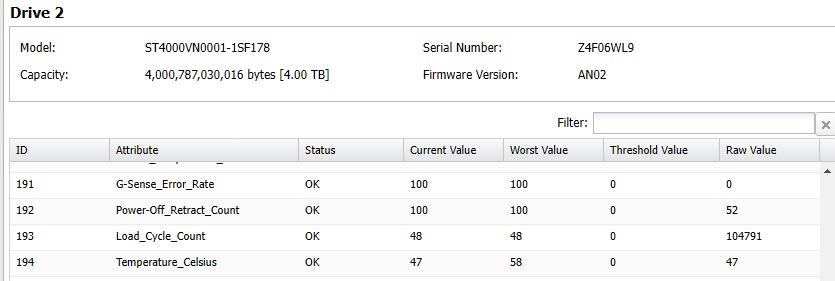
This reinstalls grub so that it looks to the second partition to boot from. Reboot and presto – it works!! I tried this with SLES15 but no luck – that uses grub2. Tried a old SystemRescueCD.iso and had success using it’s version of grub. Seems pretty resilient. A pretty straight forward fix, once I was on the right track! So hard to see the right track when you are working in a team of one and deep in your box. Handy guide I followed: Source: How to reinstall the GRUB boot loader | Support | SUSE How to reinstall the GRUB boot loader _ Support _ SUSE (local copy) 4tb Seagate HD running in a 2 bay Buffalo desktop NAS running at 136f!
in a 60 degree room. Great, now I need to monitor them? When used with an SSD, UAS considerably increases the random read and write speeds compared to BOT. To see if UAS is being used by Windows, do the following.
Source: Check if your USB 3.0 device supports USB Attached SCSI (UAS) Protocol I am using LMDE6 and a Nvidia RTX 5000 16gb to run various Local LLM A.I. models. I have been following this guide with good success: How to Run a Local LLM with Ubuntu Other links: https://ollama.com/library/phi4 So back in August there was a flurry of activity around this subject. In the time since, we have seen MS capitulate on the hardware requirement, now stating that your incompatible hardware ‘may’ not receive updates in the future. I am still undecided at this time – mostly because Microsoft has pissed me off one too many times and I have lost faith in them. They are liars. They are unfaithful. They are drive by greed and are insecure as to what they stand for. These traits do not contribute to a supportive foundation – whatever they build today will fall tomorrow as they have no belief in their own work. Windows 11 is the best evidence of these statements as possible. Additionally, it appears that Windows 10 will in fact get updates for quite some time – MS is offering paid support for at least 3 years, and as we can see with their continued support of Windows 7 in 2023, they likely will continue to release critical patches for years to come. 0Patch has already publicly stated that they will offer patches for Windows 10 until at least 2030. On top of all of this, I am unsure as to why anyone needs to patch anything anyway. Perhaps browsers, when critical faults are addressed, but at a OS level I have serious questions as to why one should update at all. With a basic firewall and trusted local users, some common sense regarding what you click on and download, I fail to see the need for updating. In fact with as rushed and haphazard as Microsoft’s updates are, applying updates immediately after release is a foolhardy practice and not recommended by most industry pros. I have several Windows 10 systems on my home network that do not receive updates (for years now) and they are just fine. The article linked below has some smart comments, I’ll post a few of the links suggested within, but give it a read. Source: Windows 10 Support ends in exactly 1 year – here are your options – gHacks Tech News https://www.0patch.com/pricing.html If you have the means, then by all means block these 241 file extensions from your incoming email. I have provided both a flat text file of the extensions and a formatted text file for Barracuda Email Gateway Defense. Once you bulk add, you can easily remove any specific extensions you want to allow through. SDR is the new HAM, and here is a great way to get deep into it. Source: Pi-Pico RX – Breadboard Version — 101 Things 0.1 documentation Whoa – this is some techno magic here Source: Install and boot from an NVMe SSD on a Dell OptiPlex 3010, 7010 or 9010 This looks like a nice getaway – One night or two?
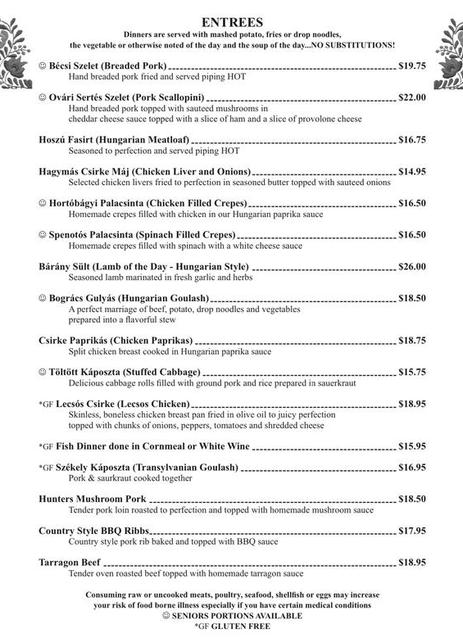
Source: Historical Society | Royer Mansion | 3909 Piney Creek Road, Williamsburg, PA, USA Not nearly enough Transylvanian-Hungarian restaurants out there – and this one is kinda close!
At a certain age, one falls for trains again. |
||||||
|
Copyright © 2026 If I only had a brain - All Rights Reserved Powered by WordPress & Atahualpa |
||||||