I’ve been thinking about providing internal email to all of my erp system users.
Running this task on our Intranet site seems a no-brainer, however there are options:
|
||||||
|
I’ve been thinking about providing internal email to all of my erp system users. Running this task on our Intranet site seems a no-brainer, however there are options: Source: SQL to identify the users involved in sessions with lock contention ProblemThis article provides sample SQL that can be used to diagnose users involved in lock contention issues. Continue reading SQL to identify the Informix users involved in sessions with lock contentionOnline Audio Tool A great tool for the email administrator in all of us. This site was dug from Brainless’s ashes and it’s not only still up and running, but still has great stuff! Source: petrockblock.com – New Fun Stuff for Technics Enthusiasts This is a great collection of tools for Hyper-V. It has been a while, but I think many of these are still working. This is a reprint of altaro’s site. Free Hyper-V Management ToolsThis is a collection of utilities intended to make Hyper-V management easier. The criteria to be included here are that the tools must be free, full-featured (no trials), and must not be locked away behind any spam or telemarketing walls. Continue reading 101 Free Hyper-V Management Tools, Scripts and Resources Larger workgroups can be a chore. For example, finding the Master Browser… Here is a batch/script for finding the Master Browser on your workgroup. Disable the Master Browser
Windows XP / Server 2003:
NIRSoft has a nice utility that can be useful as well. NetBScanner Seriously, why the fsck would anyone care?! Maybe you should learn the language of the land you are visiting, or not be pissed that you have trouble communicating. Regardless, in this case, a possible solution may be for the person to go the fsck home where everyone speaks her language and she won’t feel isolated. I wonder what experience I would have attending a top Chinese school without learning Chinese beforehand? Source: Chinese Harvard student decides ‘not to learn English anymore’ Fsck with the bear… Why on earth would anyone side with that piece of afterbirth, Putin? This sonofabitch will fsck your wife and daughter (with another man’s Richard) in front of your eyes and then toss all of you out the window. One of the most disingenuous motherfsckers in all the world. Source: Russian oil chief Maganov dies in ‘fall from hospital window’ – BBC News While nowhere near as offensive as China’s recent global behavior, I will not simply give a pass to India’s warming to Russian actions. India has no loyalty. It is simply not something that one should expect from them. We gave India over $200,000,000 for Covid relief. In fact, we have given India over $65,000,000,000 since WW2 in absofsckinglootley free money. India would rather be buddies with Putin. Lets pressure our leaders to remove all “free” aid to the country of India. Let them hit up Russia for help. Oh, and while we are at it, lets remove India’s trade status as well. If they wish to practice warring against us, at least let them do so using their own money. Source: Indian troops join Russian military exercise despite U.S. concerns A great writeup on the many ways to run stuff at startup. Oh, the simplicity of autoexec.bat! Continue reading Five Ways to Run a Program On Your Raspberry Pi At StartupDamn. Truth hits hard at 7am today. Been saying it for a few years now, but it is tough to read. I too, wonder if we have till the 2040’s.
Source: Climate change: Russia burns off gas as Europe’s energy bills rocket The Plan In the beginning, there was a plan, And the darkness was upon the face of the workers, And the workers went unto their Supervisors and said, And the Supervisors went unto their Managers saying, And the Managers went unto their Directors saying, And the Directors spoke among themselves saying to one another, And the Directors went to the Vice Presidents saying unto them, And the Vice Presidents went to the President, saying unto him, And the President looked upon the Plan And this, my friend, is how shit happens. Source: In the beginning, there was a plan, and then came the assumptions, TL:DR: http://ms-windows-store://pdp/?ProductId=9n4wgh0z6vhq Source: How to Install Free HEVC Codecs on Windows 10 (for H.265 Video) Microsoft is really showing their hand now a days. They love us so much, they want .99 cents for the new ‘divx’ codec. Yep, Bill’s once great company, the one that gave us things like Power Toys for free, now won’t even let you watch a modern movie without paying up. Why didn’t you charge the movie makers a buck to keep me from downloading it, eh, Satya? I though you were the master of the upcharge? Well, fsck you too Microsoft. You, and the cheap whore on your back. Recently found this application via Wilders Security forums. Windows Firewall Control is so good, Malwarebytes bought it and hired it’s creator! Give it a good look, it is uber powerful. But be quick – Malwarebytes has promised to delete this one from the internet at some point:
Source: BiniSoft.org Nice case design! Everything but access to pin headers, which I think can be handled pretty easily. Ordered up all the parts, keep watching for the build.
MS Giving away a OS? Wait, a not GUI OS?! What were the developers thinking back with WIndows 8? 1 Pixel window boarders are some kind of hell for everyone. It just goes to show how totally ignorant Microsoft developers are to real world use scenarios. Anyway, it is possible to fix this!
https://www.howtogeek.com/130138/how-to-change-the-window-border-size-in-windows-8/ 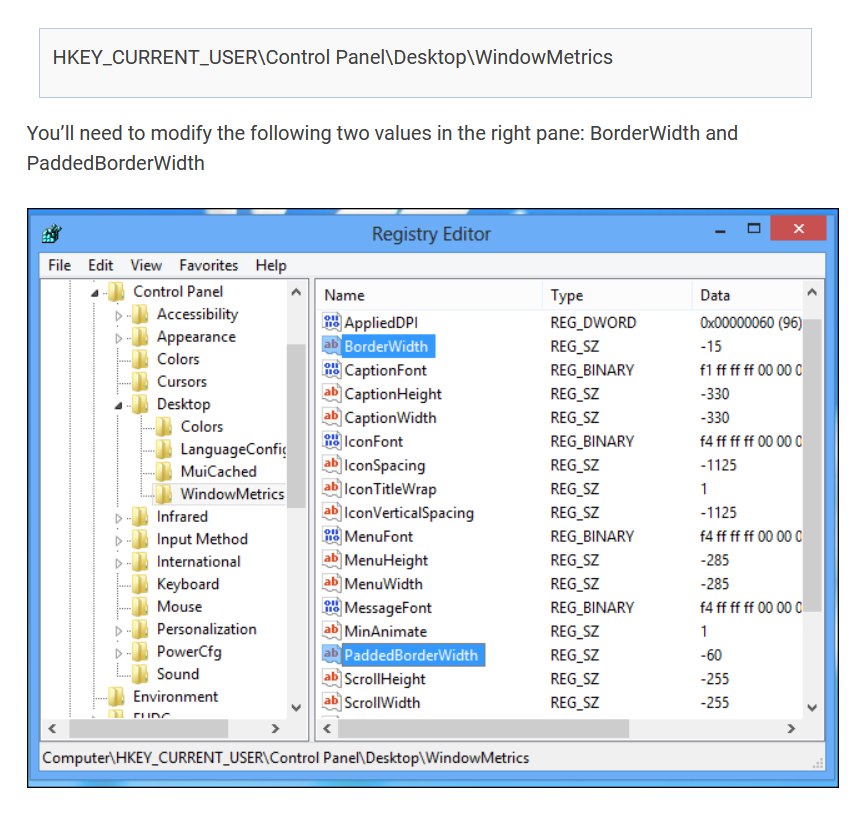 |
||||||
|
Copyright © 2026 If I only had a brain - All Rights Reserved Powered by WordPress & Atahualpa |
||||||